Welcome to Anne Gentle's just write click blog

RSS Subscribe to RSS

Embedding video in your online help

More note taking at sessions at the Quadralay WebWorks Publisher RoundUp. This session is with Stephanie Cottrell Bryant, author of Videoblogging for Dummies. She’s an ePublisher user who embeds video demonstrations of software within online help.

Customers love video embedded in the online help. Time saving for them, and no need to attend a training class. Her customers love it, love it, love it.

Tool kit she uses - Camtasia studio, Framemaker, and WebWorks ePublisher.

Need a script - but you might already have it, like a list of steps in a task.

Annoyance - don’t take your whole desktop while capturing screencasts. “Your desktop icons are like seeing your underwear on a clothesline.” :)
Also, don’t show the time of the day (like 4:00 AM) that you captured the screens, it’s sort of too much information.

Sizing of about 320 by 240 is about the right size for YouTube. Or 480×360 if you need something slight larger. If you’re delivering the video on a hard drive (installed as part of your product), you can make it even bigger. But for Internet or CHM deployment, keep it small.

Record audio first, then replay the audio while you record the video - the timing will be easier to get synched up.

She likes to use a “highlight click” feature that shows a subtle red circle showing where you click on the screen. She also modifies the cursor so that it’s larger and a yellow color while capturing the screencast.

She “cropped” out the first part of the video where she moved the screen around to the optimal location.

She recommends Flash for video output (.swf file). But if you know people are using Windows, you can make Windows Media files. If you know they’ll only be played back on an iPod, make a QuickTime file. If you want to send these video files to someone else and they don’t have Camtasia, save them as AVI - they’ll be larger files but the recipient will be able to compress them as needed and make another format. Also, any video editing software can edit AVI files.

If you want to use embedded video within an HTML file, don’t use Flash, however.

Goes into Frame, creates relative path to the movies (which is in Files folder within the ePublisher directory system), then generates the HTML using ePublisher.
She uploaded javascript to the WebWorks wiki that writes the embedded video code in on the fly, so that Internet Explorer doesn’t put a popup in front of the user, complaining about the embedded object.

In the javascript call to the video file, she’s adding an extra 10-20 pixels to the height dimension so that the player bar shows up at the bottom.

She uses conditional text in FrameMaker called “Passthrough” for all her javascript code so she can put it right into her FrameMaker file.


Posted on : Nov 06 2007
Tags: , , , , , ,
Posted under techpubs, tools |

Scott Abel, The Content Wrangler, advocate for change
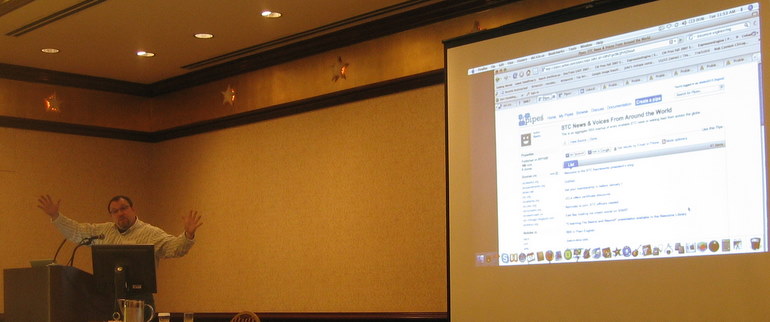
I’m listening in on Scott’s somewhat-famous Web 2.0 for technical communicators talk. He has given it 15 times this year already so I’m very excited to hear it here in Austin, TX at the Quadralay WebWorks RoundUp user conference. Here are my notes.

Scott Abel’s Web 2.0 for technical writers presentation

How can writers show they have highly transferable skills? What are the in demand skills?

information architecture, interaction design, modular content creation, localization and translation, document design, standards knowledge= document engineer (read Document Engineering by Robert J. Glushko and Tim McGrath). How to add value to our careers - by creating human- and machine-readable documents, whatever form they may take.

seeqpod.com - playable search engine. Files that exist and are playable. Does it actually look for keywords within podcasts and let you play the relevant portions of that podcast?
songsza.com

jott.com - what would you like to “jott” - automatic voice recording from your cell phone that can be played back.

tapefailure.com - clips of your users using your website - combine and compare patterns

tagging

del.icio.us - showing his list of tagged bookmarks at del.icio.us/abelsp.

Offered a case study of using for call centers using del.icio.us - have your call center people automatically add tags to items that make sense to them, then the techpubs department can see all the tags, the frequency of the items, and the different vocabulary words used for their bookmarking.

mashups

periodic table of visualization methods
simile.mit.edu/exhibit/ - how you can filter content from a web browser. See the value of visualizing data in more visual ways for the average user.

syndication, subscription

pipes.yahoo.com - visual editor for RSS feeds, bringing them together and combining them.

hosted software (Software as a Service or SaaS)

docs.google.com Google Docs & Spreadsheets (side note - I’ll be publishing my wiki talk from STC Austin using Google Docs’ Presentation tool)
thinkfree.com
zoho.com - documents, spradsheets, projects, notebook, planner, wiki, others

blogs

documentation teams or developers putting end-user doc onto blogs

wikis

interactive voice response company using wiki
parking meter company using wiki
Virgil Griffith created a wiki scanner - salacious edit site - looks for IP addresses and associates them with the company name.
DITA Storm - edit DITA pages on the web.
guided authoring - can developers write role-based documentation if they are guided to do so, with examples and guided templates so they know where content goes.

podcasts

techwritervoices.com

video documentation

viddler.com - allows you to upload videos and annotate them.
See also video jug, expert village, sclipo, 5min, viewdo, teacher tube, youtube howto

social networks

linkedin.com - LinkedIn for Groups - STC and CM Pros will offer a member directory

Get his slides from slideshare.net.


Publish to wikitext with WebWorks - from Word or Frame

WebWorks Roundup Conference

I’m attending as many sessions as I can at the Quadralay WebWorks User Conference - called the WebWorks RoundUp. Right now I’m listening to a great demo using WebWorks to publish Word or Frame source files to wikitext.

Start with WIF

The WebWorks wiki defines WIF as WebWorks Intermediate Format - basically their Document Type Definition. Serendipitous search engine love for WebWorks. I hadn’t realized that when you Google “WIF” you’ll find there is a lot of academic call for the Wiki Interchange Format - a lowest common denominator of wiki content exchange. WIF defines a subset of XHTML as an over-the-wire format for wiki content exchange.

Keep it simple

He’s demonstrating the concept with headings and paragraphs only, but I would imagine that ordered and unordered lists would be simple, even nested indented lists are simple enough to mark up.

No tables, and I’ll admit, they’re a nightmare to markup in wikitext, so I sure wouldn’t tackle writing the XSLT to create tables from XML to wikitext.

Graphics you could create the wikitext for the file reference, as long as you take the time to upload the graphics to the location where the wiki is expecting them.

Generate the wikitext

He’s generating wiki markup using XSLT transforms that he has already set up.

Wikitext markup is really simple, using ASCII characters such as == heading text == to mark up a heading. In this example markup, more equals signs surrounding the heading indicate a deeper nesting of headings. Two equals signs indicate a heading 2, three === indicates a heading 3. Paragraphs are often not marked up at all, making them the simplest output of all. Refer to the wikimatrix.org’s markup comparison tool for more examples.

I would have liked to see examples of links and image references created, but this was an hour demo after all. :)

Put wikitext into your wiki

Finally, he’s copying and pasting the marked up wikitext into his wiki. For a long article where one page is one article, this approach makes a lot of sense. I could use a tool like this for the One Laptop Per Child project, where we have a Simplified user guide all in one wiki page. Each section is editable just because the wikitext is marked up using ==section name==, which is the markup for that particular wiki (MediaWiki).

And in his keynote the following day, Ben Allums demonstrated that he could publish to the wiki itself. Now THAT is an exciting development. I’ll dig deeper into the guts of that and report back.

Scenarios for converting to wikitext

I can think of plenty of scenarios for using this conversion process. Let’s say you need a hundred page user manual put into wiki format. This type of conversion would give you a huge leg up on the pre-population of a wiki with a user guide that is already in FrameMaker or Word. I would imagine you could somehow automate the webform population. For example, use IBM’s freely available CoScriptor to record the process where you create a new wiki page, then just run the CoScriptor script and paste when needed, then run another script that renames the new wiki page.

Because you can also publish directly to the wiki, but it seems to be in a way that doesn’t touch what’s already there, this method is a great way to continually update your wiki with fresh content.

Another great use of creating wikis with a conversion process would be for API documentation, especially if you already had a large body of work in a wiki. Let’s say you’re using DITA as your source file for your API, convert new portions to wikitext.

Any other scenarios for this conversion tool?


Posted on : Nov 06 2007
Tags: , , , , , , , ,
Posted under DITA, tools, wiki |