Posts Tagged ‘computer’
XO BookSprint instructions
Adam Hyde of FLOSS Manuals wrote up these instructions for how to get involved with the BookSprint going on this week. I’m hoping to write blog entries that describe the planning sessions and surrounding practical advice for this type of writing sprint, but I wanted to let my readers know the basic overview of how to participate this very week. Thanks Adam Hyde! Adam’s presenting at DocTrain East this fall, if you’d like to know more about FLOSS Manuals and the remixing the system enables.
XO BookSprint
This week in Austin, Texas a team of writers are gathering together to immerse themselves in a one week intensive documentation jam.
The purpose of the Book Sprint is to produce documentation in 1 week to support the forthcoming 2008 roll-out off the OLPC G1G1. The team in Austin consists of members of FLOSS Manuals (Adam Hyde, Anne Gentle), OLPC (Adam Holt), Sugar (David Farning, Walter Bender), and the Austin XO Users Group, and YOU! We have set up the online tools so you too can contribute! To make a contribution please do the following :
1. Register
To contribute to the documentation you can register at FLOSS Manuals :
http://en.flossmanuals.net/register
2. Contribute!
There are several manuals planned to be finished by the end of the week
(August 29) including a Sugar manual, an XO manual, and 5 Sugar
Activities manuals. You can see the structure of the manuals here:
Sugar :
http://en.flossmanuals.net/bin/view/Sugar
XO (OLPC Hardware) :
http://en.flossmanuals.net/bin/view/XO
Sugar Activities :
http://en.flossmanuals.net/bin/view/Browse
http://en.flossmanuals.net/bin/view/Chat
http://en.flossmanuals.net/bin/view/Record
http://en.flossmanuals.net/bin/view/Terminal
http://en.flossmanuals.net/bin/view/Write
To contribute you must register and then select a manual and a chapter
to work on. if it is not marked ‘complete’ then press the edit button!
Its as simple as that.
Contributions can include cleaning up layout, spell checking, adding
images, proof reading, or taking responsibility for writing one of more
chapters. You don’t have to be a technical writer or a super geek, you
just need to know how to write.
If you need to ask us questions about how to contribute then join the
chat room listed above and ask us! We look forward to your contribution!
For more information on using FLOSS Manuals you may also wish to read
our manual :
http://en.flossmanuals.net/FLOSSManuals
3. Chat
Its a good idea to talk with us so we can help co-ordinate all
contributions. We have a chat room for this using Internet Relay Chat
(IRC). If you know how to use IRC you can connect to the following :
server : irc.freenode.net
channel : #olpc-content
If you do not know how to use IRC then visit the following web based
chat software in your browser :
http://irc.flossmanuals.net/
Information on how to use this web based chat software is here :
http://en.flossmanuals.net/FLOSSManuals/IRC
Ebooks showdown Kindle vs. XO laptop from OLPC
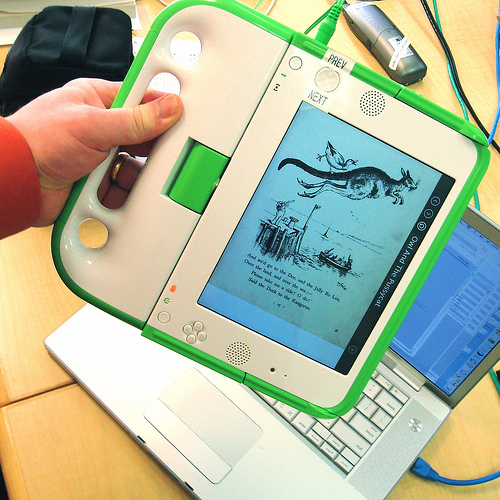
I’m learning more about ebooks thanks to some recent inquiries related to my work for One Laptop Per Child (OLPC) to collaborate on the kid’s user guide. I’ve been so busy with that I’ve barely had time to blog. I’m learning so much it’ll add to the blog entries later.
But I have been noodling on the fact that Amazon’s Kindle and the OLPC XO are at the exact same price - $400 - and that the XO can be used as an ebook reader (PDFs preferred.)
I’m going to try to do a comparison here, but please realize I’m no ebook reader expert nor have I owned one in the past. So I really have no business writing this at all other than my innate curiousity and love of researching and then presenting information.
On to the interesting comparison - let’s look at other parameters, and feel free to suggest your own. Like I say, I have no business writing an ebook comparison so do pitch in where you see fit.
Amazon’s Kindle ebook reader versus the One Laptop Per Child XO in ebook mode
| Comparison item | Kindle | XO |
| Dimensions | ||
| Price | $400, free shipping | $400, about $25 shipping, $200 is a tax-deductible donation, so slight discount depending on your US tax bracket, I suppose |
| Content | DRM content, can’t read PDFs unless you have a Windows PC and convert them first. | Mostly PDF, but plans for more format support. With the built-in browser (Browse Activity), many reading materials are available such as Project Gutenberg. |
| Usability | Robert Scoble has a harsh usability review of the Kindle. | Robert Nagle I hope will review it in the future, but he has a great review of the possibilities as an ebook reader for kids. And I like the review written by a 12 year old. |
| Battery | 30 hours | 4-5 hours |
| Wireless connectivity | Uses a wireless cellular network it calls Whispernet to deliver your Kindle content. It’s EVDO. | Uses 802.11b and comes with a free one-year subscription to T-Mobile wireless service. |
| Screen | monochrome: 600 x 800 pixels (167 dots per inch) | monochrome: 1200 x 900 pixels (200 dots per inch), color: 1024×768 perceived (it’s complicated, see the hardware specs PDF.) |
| Warranty | one year | 30 days |
Gizmodo already put the Kindle up against the Sony Reader in this online poll. I realize that the OLPC XO is intended to be a kids laptop, and it’s not really fair to pit it against the Kindle because that’s not the design of the device (nor the intentions of the project behind the device.) But your $400 might be well spent here.
By the way, I read about expected XO delivery information from the new XO User’s Facebook Group 50 members and growing. If you order now, you’ll get your laptop arund the same time as a child in Afghanistan, Cambodia, Haiti, Mongolia or Rwanda - in early 2008. See Shipping information on laptop.org.
Subscribe to RSS
