Welcome to Anne Gentle's just write click blog

RSS Subscribe to RSS

The state of free documentation

That’s free as in freedom, and today’s post includes a link to Adam Hyde’s blog entry of the same title on FLOSS Manuals and some response based on my experiences so far.

Floss Manuals

What motivates people to contribute to documentation projects for free? Is the documentation actually free as in no-cost? I’ll speak from my own experience and draw from recent research in this area. Plus, I just read Chris Anderson’s excellent essay on free as a business model and learned about the multiple economies and values and currencies available to us today such as the gift economy or labor exchange.

In my Wiki-fy your doc set presentation, I talk about the motivations for people contributing to any online or community documentation, and these four categories apply for any online community, be it a wiki or a mailing list:

  1. reciprocity
  2. reputation
  3. efficacy
  4. feeling like you belong or identify with a group or cause.

These four categories explain why people are motivated to contribute for no pay (for free) to a documentation project. This poster presentation for a “General Online Research” conference 2008, GOR 08, offers even more insight into contributions to Wikipedia as well as reasons people cite for not contributing content but reading only. Now, I agree with Stewart Mader that “your (enterprise) wiki is not Wikipedia” but there are lessons to be learned from Wikipedia as well. Take a look at what they found motivated contributors:

Rank Motive
3.71 Free access to knowledge for everyone
5.15 Task enjoyment / Fun
5.33 Learning
6.55 Belief in the future of Wikipedia
6.69 Existing information was inaccurate
7.25 Quality improvement of Wikipedia

At the unconference last week, Tom Johnson asked me, why did you get started with documenting the OLPC project? My initial motivation was that someone who I used to work for asked me, and he works for Joann Hackos. So reputation was one motivating factor, but as I read more and more about the education goals of the OLPC project on laptop.org, the more I saw it as an opportunity to identify with an education cause especially as related to my own kids computer educations and expanding their horizons beyond Windows. Why are any of us interested in documenting a complex product or process? It’s possible that at the heart of our motivation is recognition or reward in terms of money or success. But, an underlying motivator for many technical writers is that we like to help others learn, which ties into my education motives. We may also think that writing and communicating with images, audio, or video is a great way to make a living. What I am observing more lately is that community members want to write or share content as well.

Last year, O’Reilly ran a survey asking about the motivations that people have for contributing to online documentation, be it via a forum, a mailing list, or a web site. With 354 responses, I’m sure there’s a wide variety of answers, but certainly some patterns emerged. Andy Oram dissects them in a five plus page article. My favorite line on the first page is “And while fixes to particular errors are easy to convey, best practices are not.”

His report contains many findings that are unique, because no one else had been asking the questions. What he found that surprised me was:

  • People surveyed don’t think they are contributing to the documentation
  • People surveyed didn’t think of themselves as writers

Indeed, community building is the more important ranked reason for contributing to online documentation, rather than personal growth.

I have seen that rather than the monetary gains you can make by freelancing documentation, the currency of community is a payment schedule all on its own right.

The “free” offerings represent a shift in thinking. It’s not that no one paid for the doc to receive it. Nor did anyone get paid to write it. But the infrastructure in place enabled a sense of free-ness, freedom, and lack of cost. In reality, an elite group of people who have computers (starting at US$600 or so) and pay US$40 a month for Internet connections trade in t their time and knowledge in hopes of getting repaid in time and knowledge, recognition, a sense of belonging, or a payback in time by being more efficient.

This shift represents a new economy for documentation. Payment is in a different, “free,” no monetary cost form.


Posted on : May 14 2008
Tags: , , , ,
Posted under writing |

XO doc and the journey to wiki-fied documentation

Just wanted to give another update on the happenings in the end-user doc front from my neck of the woods. (Idioms sprinkled throughout!)

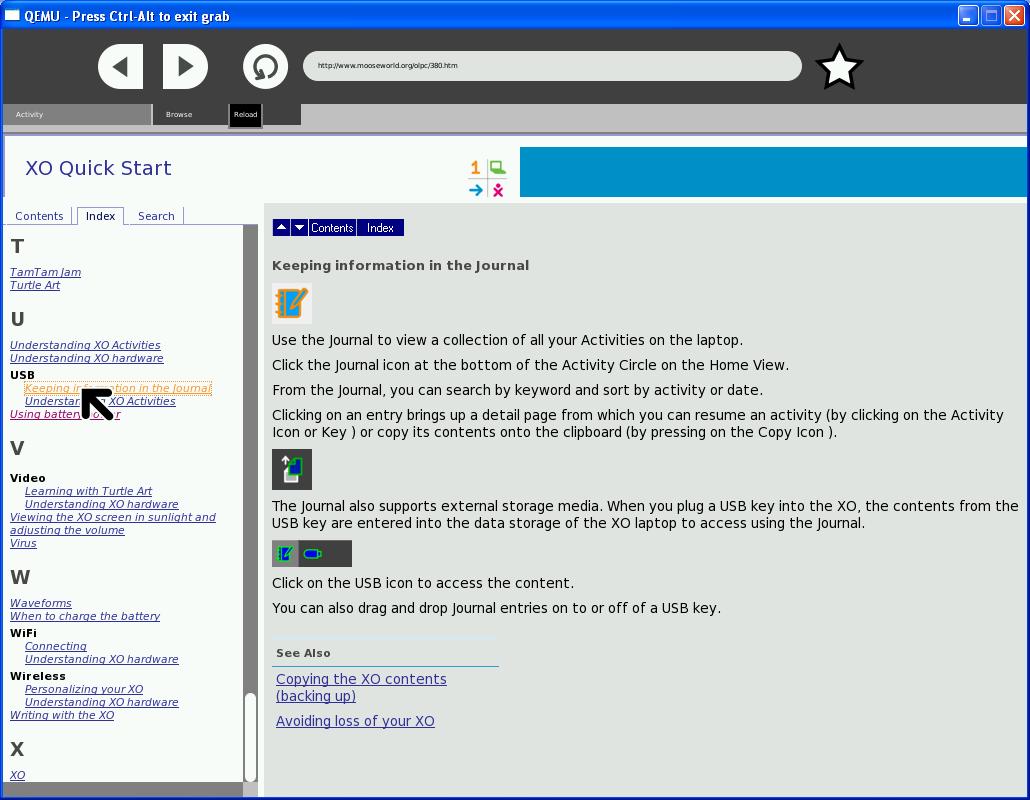
I got an HTML copy to SJ and a second copy with an Index and some customizations on the CSS. I tested it on an XO emulation and the Browse Activity does really well with the Index and search so I’m pleased with the results.
http://www.mooseworld.org/olpc/index.htm

Here’s what it looks like when you view it on an XO in the Browse Activity (click on the image to see it full-sized).

XO Quick Start

I’ve written a letter of appreciation to Author-it for giving us the license and ability to do quick rearranging. It’s coming in handy.

Adam Hyde of FlossManuals.net and I met to talk about a migration path for the kids end-user doc content at http://wiki.laptop.org/go/Simplified_user_guide. They’ve just finished a lot of translation work so that we can also have multiple language versions of the simple user guide on the FM site and translators could work in a side-by-side view which is nice. The next steps are for me to re-arrange the content in Author-it into an outline closer to the structure that FM uses (Introduction, Installing, Interface, Tutorials, Appendices). Once I get the new structure to the content, Adam and I and anyone else who wants to pitch in can do copy and paste of the HTML into the FM pages. Adam’s filling out the infrastructure on FM now here:
http://en.flossmanuals.net/bin/view/OLPC_simple/WebHome

From Adam I learned that the formatting of the print versions out of the Floss Manuals wiki uses Scribus - http://www.scribus.net/. It’s an open source page layout and publishing tool.

Also, I have had a few people contact me this week to see how they can help so I’ve sent them the information about the different groups for the different user guides from the wiki.laptop.org/go/Manuals page. Here are the basics for how to help.

  1. Join the Library list at http://lists.laptop.org/listinfo/library where documentation discussions occur.
  2. Sign up for an OLPC wiki account at wiki.laptop.org.
  3. Download and install an emulator. (optional, but helpful) QEMU is an open source processor emulator that can emulate an entire PC, including its peripheral devices like the disk, display, network, and so on. You must download and install this package to emulate the XO laptop.
  4. Become familiar with the Simplified User Guide at http://wiki.laptop.org/go/Simplified_user_guide and read about the audiences at http://wiki.laptop.org/go/Manual.
  5. Feel free to edit or start a new page with a new audience in mind. Note that we are porting the kids manual to Flossmanuals.net so also become familiar with their structure.

I’ve also started an Educator’s Guide at http://wiki.laptop.org/go/Educators_guide . I am way out of my league writing about constructivism and intervention guides (lesson plans) but I figure I have to start somewhere. I also want to link to as many additional reading materials about constructivism and how to teach with that learning theory in the forefront. There’s a nice post over at OLPC News that has great reading materials and ideas for accessories. I’ll also study the http://wiki.laptop.org/go/Educational_activity_ideas page as well.

I still have some edits that I need to do to the Simplified user guide wiki page, and I really want to re-write the interface instructions (or someone else could if they are feeling energetic.) I recently re-wrote the instructions for installing a new activity with screenshots from Update.1 for each. So I’m now able to run Update.1 in my emulation environment.

I’m also working with people who have worked on the artwork. There are some talented artists giving their time to the project.

The journey to Floss Manuals is going to be interesting for several reasons. One is, which wiki is source? Floss Manuals or wiki.laptop.org? Adam and I will likely have to get notifications on each wiki and attempt to keep them synced. I’m also trying to design for re-use because it’s easy to remix manuals in Floss Manuals. So there should be a way to use content from the simplifed user guide where kids are the audience for the teacher or instructor’s guide. The translation workflow in Floss Manuals lets the translator view both text side by side, which will be helpful I believe, but there’s no translation memory.

Another observation - my perception is that OLPC really wants the wiki.laptop.org to be the single place to get information. A recent status update encouraged the developers to make sure their Activity wiki pages are clean, neat, up-to-date, and accurate. However, there is a nice set of topics at laptop.org/start that the Give1Get1 participants are pointed to in the letter they receive when opening their XO laptop box. (Thanks to whurley for posting his xo unboxing photos on flickr.)olpc_letter.jpg

Since I think it is a good idea to have these separate pages, my perception is that there is definitely a limit to what the wiki can do for the general public (although I would qualify that statement by saying that most XO participants are not the general public.) The laptop.org/start pages are an excellent design and clearly written with an easy-to-use navigation system. I’d love to find out the page hits and find out if there’s any way to measure effectiveness of those pages versus the wiki pages (or the wiki as a whole).


Posted on : Dec 31 2007
Tags: , , , , , ,
Posted under wiki |