Welcome to Anne Gentle's just write click blog

RSS Subscribe to RSS

Wiki for documentation

Stewart Mader has created a series of videos available at www.ikiw.org/21days called 21 Days of Wiki Adoption.

Each video is short, encapsulated, and easily digested when you need a break. I’m really enjoying them, and the cool US map background behind Stewart.

Stewart Mader day 12 of wiki adoption video series - Documentation

Day 12 is Documentation. Great ideas there, involving authoring in the wiki and using the wiki engine to publish a PDF. I’m working on a blog entry describing authoring in DITA and outputting to a wiki, but it’s also nice to hear of the other way around.


Posted on : Feb 25 2008
Tags: , , , ,
Posted under wiki |

WikiMedia wiki text - best formatting for step-by-step instructions with graphics for each step?

Getting into the trenches of wiki editing has certainly taught me a lot. My learning has mostly been by trial and error and experimentation. I’m playing around with the best way to use Wikimedia wikitext for step-by-step instructions with graphics for each step. (And wishing that Wikimedia was just HTML based, I know the rules there.)

I’m learning a couple of things. One is, add in any new line and the wiki thinks you’re starting over your numbered list. For example, I was trying to do a numbered list with graphics after each number.

Doesn’t look like I expected

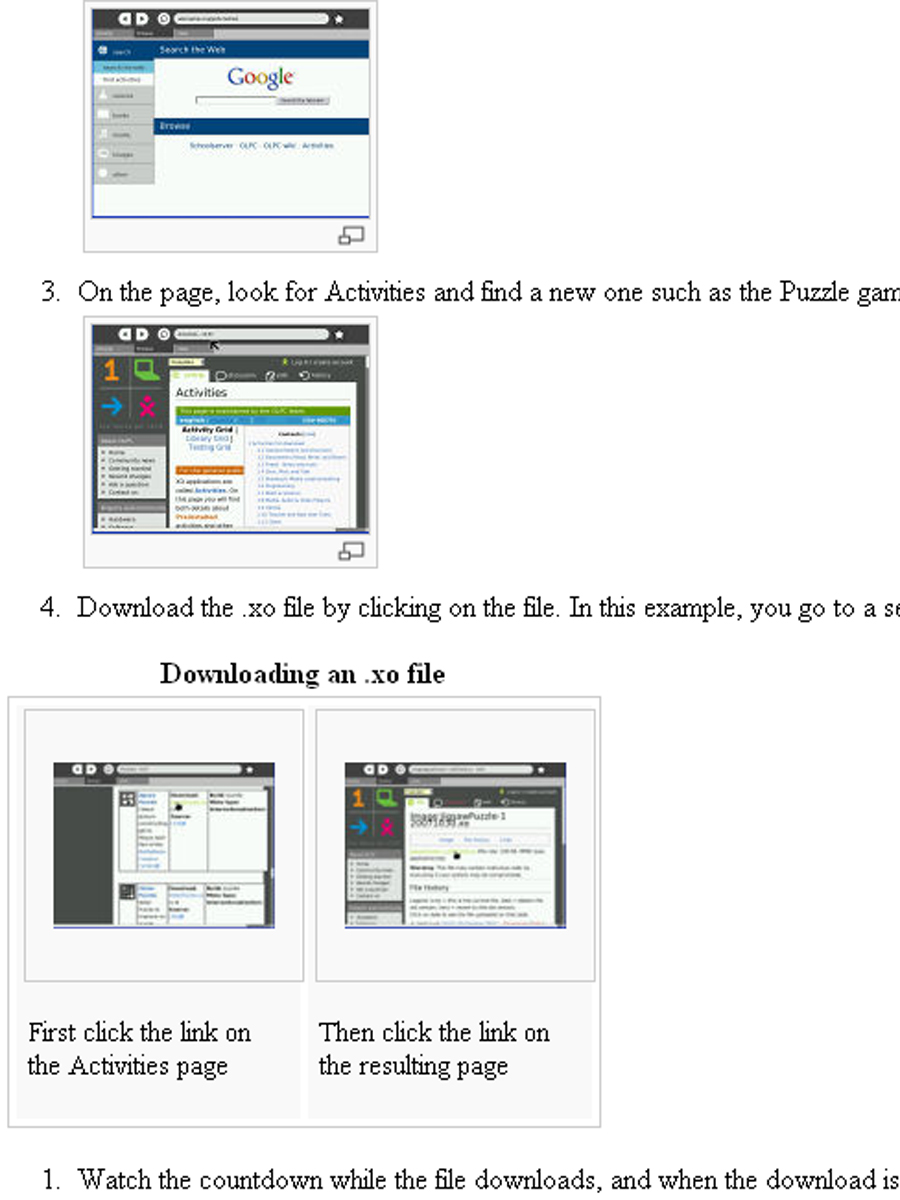
# From the Home view, launch Browse.
[[Image:Launchbrowse.jpg|none|thumb|150px|Browse Activity]]
# Type wiki.laptop.org/go/Activities and press Enter.
[[Image:Browsegoactivities.jpg|none|thumb|150px]]

This wikitext gave me 1. first step blah blah blah followed by 1. second step blah blah blah. Woops! Not what I wanted. So instead, I put a space instead of a new line.

Works like I was going for

# From the Home view, launch Browse.[[Image:Launchbrowse.jpg|none|thumb|150px|Browse Activity]]
# Type wiki.laptop.org/go/Activities and press Enter.[[Image:Browsegoactivities.jpg|none|thumb|150px]]

This wikitext gave me 1. first step 2. second step.

Now what to do

But then I tried to get fancy with the <gallery> tag to combine graphics for one of the steps. That restarted my numbered list at 1 after the gallery tag.

<gallery caption="Downloading an .xo file">Image:Jigsawxo.jpg|First click the link on the Activities page
Image:Versjigsawxo.jpg|Then click the link on the resulting page</gallery>

Numbering restarts at 1 after 4

I’m feeling a little lazy so I won’t research very far. The Extended image syntax page on Wikipedia had the most detail that I’ve found so far. I’ll probably just put the second XO download screenshot on the same line as the other so that the list numbering will work. Or try it for yourself at the OLPC Simplified User Guide, Installing New Activities section.


Posted on : Dec 22 2007
Tags: , , , ,
Posted under wiki |

Wiki as forum, FAQ, HTML editor, XML editor, or CMS?

Wiki as the new FAQ

I discovered and have been meaning to write about Wiki is the new FAQ, an excellent blog post talking about SAP’s use of a wiki featured in an article in the Wall Street Journal. I especially like the play on words in the title. Reminds me of “brown is the new black” or “pink is the new blog,” hee hee.

A wiki can be a Frequently Asked Questions repository, much like the knowledge bases in their heyday in the late 80s. My favorite line from the blog entry has to be its closer: “It’s about a different way of thinking around how to interact with the community.” And that is what I have explored with my wiki presentation, about how to build community with a wiki and be an active member of that community. But what are other uses of the wiki?

Wiki as the next-generation customer forum

For many information seekers, wikis are better than forums because they are more easily searched and once you get a hit, the articles are meant to be scannable. Compare and contrast this to a long thread on a support forum where the answer to your question might be buried in the middle of a discussion about the mysterious beep in someone’s house. In my beep example, there are literally 78 pages of forum discussion, and if you read through the threads, you discover that a group of people took it upon themselves to go to the person’s house to find the beep. It has probably two years of forum discussion around the possibilities. Quite a fun and entertaining read, though, but not that efficient. Still, consider the community that built up around beep troubleshooting. Great stuff there.

But consider that your software users might not have the time to read through even a few pages of a forum discussion about a solution to their problem. That is where a wiki could be more useful than a forum. While forums are a fun online community for many, wikis might be the new generation of forum and many wiki engines offer comments on each article which are the next evolution of a forum - you can discuss the article itself. Another blogger, Leigh Blackall of Learn Online, discovered “The gold in a wiki is often in the discussion pages.”

Wiki as an easy HTML editor

Wikis originated as the quickest way to create a website without having to know HTML code. Really, wikitext is all about quickly doing headings, paragraphs, and lists.

Unfortunately each wiki has different rules for how to indicate a heading or list item or type of list. For some, it might be easier to just learn HTML code. And in the case of the Drupal CMS, there’s the ability to either use a rich-text editor or hand-code the HTML. It’s easy to troubleshoot when you can just view the HTML code, but what’s odd is that sometimes the resulting <div> tags generated out of your webform entries in Drupal seem to overlap.

But most wiki engines offer the fastest and easiest way to make a web page with a URL that you can consistently refer to.

Wiki as the new book

Some folks are pre-populating their wikis with book content, which is always an interesting test of what parts of a book are considered essential for “bookness” or “wikiness” - do you keep a table of contents? Is there any index? What page metaphors do you subscribe to in the wiki? These questions can be answered by looking for examples and analyzing their success. I especially like using wikis for the wiki aspects that go above and beyond books. For example, I’ve been exploring the Meatball Wiki site (Thanks Janet!) - and they have an excellent page with all sorts of Indexing Schemes categorized, such as Readership and Authorship which are fascinating for use in wikis as opposed to books. The Ontology category seems the most book-like to me, and I really like how that page offers ideas for all the possibilities that wiki offers.

Wiki as the new website

Does any company use only a wiki as its public-facing website?

Wiki as the new Content Management System

Eventually, the wiki can be the source files for important content, and I would guess there are people moving towards this wiki-as-cms system already. With my work with the OLPC project, I am learning more about wikis as source files, and found that the compare is actually quite powerful visually. Take a look at two versions of the demo or release notes from a release done in September. There is color coding and side-by-side comparison of text that is easily scanned for what changed, was added, or deleted. I’m learning so much about wikis for localization and translation efforts as well with the OLPC project. For example, this past week, I added links to translated content, such as the Spanish translation of the Simplified User Guide. The wiki engine itself (in this case, WikiMedia), lets me list the additional language pages in a blue bar on the original page, and then each language page automatically links back to the main language page (in this case, the English page.) Automatic is nearly always useful.

Do you see wikis being the next generation of other documentation outlets? Do tell.


Posted on : Nov 19 2007
Tags: , , , , , , , ,
Posted under wiki |

Publish to wikitext with WebWorks - from Word or Frame

WebWorks Roundup Conference

I’m attending as many sessions as I can at the Quadralay WebWorks User Conference - called the WebWorks RoundUp. Right now I’m listening to a great demo using WebWorks to publish Word or Frame source files to wikitext.

Start with WIF

The WebWorks wiki defines WIF as WebWorks Intermediate Format - basically their Document Type Definition. Serendipitous search engine love for WebWorks. I hadn’t realized that when you Google “WIF” you’ll find there is a lot of academic call for the Wiki Interchange Format - a lowest common denominator of wiki content exchange. WIF defines a subset of XHTML as an over-the-wire format for wiki content exchange.

Keep it simple

He’s demonstrating the concept with headings and paragraphs only, but I would imagine that ordered and unordered lists would be simple, even nested indented lists are simple enough to mark up.

No tables, and I’ll admit, they’re a nightmare to markup in wikitext, so I sure wouldn’t tackle writing the XSLT to create tables from XML to wikitext.

Graphics you could create the wikitext for the file reference, as long as you take the time to upload the graphics to the location where the wiki is expecting them.

Generate the wikitext

He’s generating wiki markup using XSLT transforms that he has already set up.

Wikitext markup is really simple, using ASCII characters such as == heading text == to mark up a heading. In this example markup, more equals signs surrounding the heading indicate a deeper nesting of headings. Two equals signs indicate a heading 2, three === indicates a heading 3. Paragraphs are often not marked up at all, making them the simplest output of all. Refer to the wikimatrix.org’s markup comparison tool for more examples.

I would have liked to see examples of links and image references created, but this was an hour demo after all. :)

Put wikitext into your wiki

Finally, he’s copying and pasting the marked up wikitext into his wiki. For a long article where one page is one article, this approach makes a lot of sense. I could use a tool like this for the One Laptop Per Child project, where we have a Simplified user guide all in one wiki page. Each section is editable just because the wikitext is marked up using ==section name==, which is the markup for that particular wiki (MediaWiki).

And in his keynote the following day, Ben Allums demonstrated that he could publish to the wiki itself. Now THAT is an exciting development. I’ll dig deeper into the guts of that and report back.

Scenarios for converting to wikitext

I can think of plenty of scenarios for using this conversion process. Let’s say you need a hundred page user manual put into wiki format. This type of conversion would give you a huge leg up on the pre-population of a wiki with a user guide that is already in FrameMaker or Word. I would imagine you could somehow automate the webform population. For example, use IBM’s freely available CoScriptor to record the process where you create a new wiki page, then just run the CoScriptor script and paste when needed, then run another script that renames the new wiki page.

Because you can also publish directly to the wiki, but it seems to be in a way that doesn’t touch what’s already there, this method is a great way to continually update your wiki with fresh content.

Another great use of creating wikis with a conversion process would be for API documentation, especially if you already had a large body of work in a wiki. Let’s say you’re using DITA as your source file for your API, convert new portions to wikitext.

Any other scenarios for this conversion tool?


Posted on : Nov 06 2007
Tags: , , , , , , , ,
Posted under DITA, tools, wiki |

DITA and wiki - w/ho/w will (we/you) write

I received an excellent question from a reader about his eagerness to use wikis for his product’s doc set, but he came across conflicts and issues when he questioned the practicality of maintaining a wiki for his large set of documentation. Here’s Paul’s well-phrased request for information.

I am considering using a wiki for documentation projects, but have been coming across some showstopper issues. Here is the story:

Our documentation set is large. We only want to maintain one set of files. Therefore, any changes in the wiki would need to be automatically synched with the source files.

The obvious suggestion is “just make the wiki your source files.” However, it is not as simple as that, for a few reasons.

  • First of all, we need to generate attractive offline documentation in online help format, viewable across several operating systems. No wiki enables an elegant way of doing that.
  • Secondly, we have a bunch of conditional text–our existing documentation comes in six different versions. I have not found a good way to integrate the different conditional tags into a wiki, while maintaining it in both our sources and the offline output files.
  • Finally, wikis almost by nature do not support DITA. Wikis are designed to be simple and easy to understand. However, that approach negates many of the advantages of structured writing.

For these reasons, I currently see wikis primarily as a collaboration tool. But they do not have the features necessary for complex technical documentation.

Do you have ideas for how we could get around these issues?

Oddly enough, on this particular day, another reader wrote in about similar issues with wikis, but they have started to overcome them. He listed the issues succinctly, saying:

I’d say that there is quite an art to creating wiki doc from a couple of perspectives:

* conversion
* building out the infrastructure
* look-and-feel issues
* style issues
* review issues
* basic editing issues

Even with all these issues — :) — however, the immediateness of the experience, the ease associated with making changes and the creation of links and containers, and the modern look and feel really make wikis a fascinating competitor with other, much different technologies. How many other industries move off in such opposite directions (wikis vs. dita)? It’s sort of like trying to figure out whether cars should run on gas or steam!

The CEO of Confluence came through a few weeks ago. He was pointing out to the following as an example of a company that had developed wiki doc:

http://www.gigaspaces.com/wiki/dashboard.action

Here are two more you might find interesting if you don’t already know about them:

http://docs.codehaus.org/display/GROOVY/Documentation

http://www.aptana.com/docs/index.php/Main_Page

And here’s the part that is amazing to me - in a follow up email, Paul answered some of his own questions and said that the gigaspaces.com wiki is one wiki he is investigating further. For example, by talking to one of the writers, he learned that their wiki has 1300 pages, and reuses many pages through the [include] command or transclusion, which is the inclusion of part of a document into another document by reference. My original response to Paul talked about DITA as source files and wiki as an output from those source files. I learned that Robohelp does something like that, with source files and wiki as output, and this blog post mentions round-tripping the content back to Robohelp.

Naturally, I have some ideas about DITA and wikis. My post about DITA Storm built into a custom wiki describes a hybrid approach, with DITA files as the source and editable pages. Paul takes that idea one step further, saying that you could have the internal technical writers see a DITA editor interface to the wiki, but have end-users write doc in a simplified editor with fewer tags. I like that idea.

There’s also the possibility of a transform from DITA to wikitext. A search on the dita-ot-developer list on sourceforge.net revealed that Deborah Pickett was writing such a thing for her employer last April. I emailed her and she generously gave me her XSLT source files, but said that she gave it up when she found that “The whitespace rules for wikimedia meant that anything fancy would end up being better written in wikimedia’s pretend HTML format anyway.” Hm. I haven’t tried the transform yet myself. Bob Doyle has done a lot of DITA to WikiMedia transformation to pre-seed the ditawiki.org with content, and he says “The Perl script for conversion to MediaWiki is publicly available at http://www.jtidy.de/conv. It has a major flaw in that it does not convert URLs to hyperlinks.” Again, I’d need to try it myself to see whether that approach would work and if the technology scripting is worth the effort.

Now, for everyone pondering wikis and DITA, an absolute must read is this great article by Paul Prescod, The Convergence of Structure and Chaos. Not that it offers practical solutions (although he hints at some at the very end), but it maps DITA concepts to wiki concepts.

I’ve also been noticing that people are trying to automate getting content from their support forums into wikis… Check out this poor intern’s daunting task: http://ask.metafilter.com/62679/Automated-Media-Wiki-Page-Creation.

I guess to answer my own question about where wikis fit in tech doc, I currently see wikis as supplemental, not source doc from which to make other things. I probably lean towards seeing a wiki is another output from perhaps DITA source. Sure, there would have to be a loopback mechanism to get the contributed parts of a wiki back to the source files, and I’m not sure how automated that could be. But, I would love it if vendors could convince me otherwise, and frankly, I keep hearing about Confluence and their examples are compelling.

So I share with you these side conversations I’m having in hopes that the information here helps others in their quest to offer wikis to their end-users. Users, write the manuals. But make sure us writers get to meet our objectives as well.

As a final departing thought, I share the machine is us/ing us video, containing the best description of Web 2.0 and new media I’ve seen to date, created by a cultural anthropologist. It’s about five minutes long, and a thought provoking piece.

One of the questions in it that stuck in my mind was the question at about 3:00 minutes, “Who will organize all this data?” And the typed and re-typed answers after a screencast or demo of del.icio.us:

We will.

You will.