Just Write Click

Technical writing with Continuous Integration and docs-as-code

  • JustWriteClick
  • Contact
  • Books by Anne Gentle
  • Introducing Docs Like Code
You are here: Home / content strategy / Documentation as Conversation with CSS

May 22, 2013 by annegentle

Documentation as Conversation with CSS

Documentation as Conversation with CSS

Three types of speech balloons: speech, thought, scream.

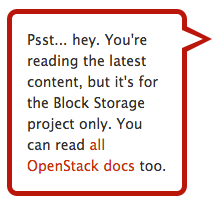
I love to explore new ways of conveying technical information, and I’m interested in documentation as conversation. Last year I wanted to convey a “side note” on each page of a Sphinx site, as if the page were talking to you. I needed to let people know that there are additional documentation pages available. So, I went looking for a CSS design that would let me put the note into a particular tag and style as I like. I found it at Pure CSS speech bubbles. The humorous part was figuring out what speech bubbles are also called so I could do a Google search. Speech balloons? Dialog balloons? Word balloons? I never did come up with balloon but somehow found bubble.

For Sphinx sites, which are built from RST (ReStructuredText), you use a layout.html file in a _theme folder with your .rst source files. This templating is explained in more detail on the Sphinx documentation site at http://sphinx-doc.org/. In this case, the p tag is styled with css classes. Here’s what the HTML looks like:

<p class="triangle-border right">
Psst... hey. You're reading the latest content, 
but it's for the Block Storage project only. 
You can read <a href="http://docs.openstack.org">
all OpenStack docs</a> too.</p>

The CSS is much more involved, giving borders and rounded edges and putting that little triangle to indicate the speech. You can see it embedded in the Sphinx framework at tweaks.css. You can select a border color to match the rest of your page. Here’s the resulting HTML output. Speech bubble example
You may have seen the trend towards comic books or comics to explain technical topics, such as the one for Google Chrome at http://www.google.com/googlebooks/chrome/. There are drawn comic characters explaining the browser design considerations throughout, with speech bubbles, hand waving, folded arms, lots of body language expressed throughout. This simple side bar doesn’t attempt that level of engaging content, but it’s a playful way to let people know there’s more than a single page for OpenStack docs. What do you think about such techniques, are they playful and harmless or sloppy and annoying?

Related

Filed Under: content strategy, techpubs, tools, writing

More reading

Bubble graph showing sources of developer support data

I’ve been thinking a lot about developer support at Cisco recently, especially for the way the world works today with multiple cloud providers. This post is a re-publish of my talk from over five years ago, but the techniques and tools for listening and helping others are still true today. At Rackspace, we watched several […]

Cisco DevNet is our developer program for outreach, education, and tools for developers at Cisco. From the beginning, the team has had a vision for how to run a developer program. Customers are first, and the team implements what Cisco customers need for automation, configuration, and deployment of our various offerings. Plus, the DevNet team […]

I had a great talk with Ellis Pratt of Cherryleaf Technical Writing consulting last week. Here are the show notes, full of links to all the topics we covered. Podcasts are great fun to listen to and participate in, if a bit nerve-wracking to think on your feet and make sure you answer questions succinctly […]

At the beginning of this year, I worked hard to summarize my thoughts on API documentation, continuous publishing, and technical accuracy for developer documentation. The result is an article on InfoQ.com, edited by Deepak Nadig, who also was forward-thinking in having me speak to a few teams at Intuit about API documentation coupled with code. Always […]

Recently on Just Write Click

  • A Flight of Static Site Generators: Sampling the Best for Documentation
  • Try a GPT about “Docs Like Code” to ask questions
  • Discipline and Diplomacy: Docs in the Open
  • Let’s Find Out: When Do Static Site Generators Do Rendering?
  • GitHub for Managing Tech Docs

Just Write Click in your Inbox

Enter your email address to subscribe to Just Write Click and receive notifications of new posts by email.

Read More

  • Privacy Policy
  • About Anne Gentle, developer experience expert
  • Books by Anne Gentle
    • Conversation and Community
    • Docs Like Code, a Book for Developers and Tech Writers
  • Woman in Tech Speaker Profile
  • Contact

Books

  • JustWriteClick
  • Contact
  • Books by Anne Gentle
  • Introducing Docs Like Code

Copyright © 2025 · WordPress · Log in